Showing posts with label efficiency. Show all posts

1.01.2011

New Years Grad Student Resolutions


1. I will read as many papers as I can on the computer and not waste my pennies on printer ink.

2. I will not accept rough drafts no matter how big and pleading students' eyes get.

3. I will use my campus breaks to go to the gym, not to nap on my jacket on the floor of my office.

4. I will blog more.

5. I will back up everything all the time, on hardware and in the cloud, so I never lose a term paper ever again.

6. I will take time every weekend to turn off my blackberry and my laptop and spend time with human beings.


Happy New Years 2011!

11.12.2010

Our storage solutions for two people in a studio on a TA budget

We've made a lot of changes in the apartment to make cohabitation possible, and I wanted to share a few of them.  Not bad for the super tight budget dictated by a meager TA salary, if I do say so myself.

1. I got as much little stuff off of horizontal surfaces as possible. This is one of my proudest and laziest DIYs: I tucked some cork board into this red picture frame of my mom's for a snazzy earring holder! Ah, craftiness.


2. We utilized tall shelf space to to its max, instead of wasting it with short stuff. Aren't our matching Mountain Hardware phantom sleeping bags sickeningly adorable? On the top shelf are the Costco sized cleaning products.


3. We got these shelves for free on Craigslist, scrubbed them off, cut them up, and mounted them with about twenty bucks worth of Home Depot hardware. Voila!  Closet for two.


4. We stacked the books to the extreme. Yes, this Ikea shelf will probably break eventually, but whatever.


5. We got shoe racks.  Definitely worth it.

11.02.2010

Technology to stay organized, from a presentation I gave to first years


Two weeks ago I was asked to give a short talk to first year PhD students about the technology I use in my graduate work. I figured I might as well share what I talked about here, in case it can help anyone else.

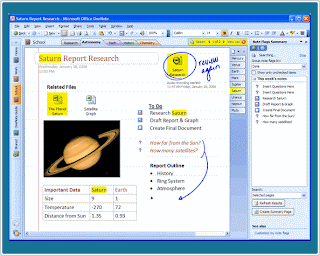
I had a list of talking points set up in MS OneNote, which is my personal favorite note taking software.  My favorite thing about OneNote is the super easy hyperlinking.  My notes are like my own personal Wikipedia, with words and references linking to other notes and definitions, or even web pages and documents.  I use OneNote for absolutely everything, from organizing recipes, to keeping track of payments and confirmation numbers, to extensive notes on meetings, classes and colloquia.   Everything relating to school is in one notebook.  Within this notebook, there are "section groups" that organize my classes, my committees, my research, and logistical information.  Within these section groups, for example classes, you will find one section for each class I am taking (I archive classes from past quarters in another section group). In the section for a class, I keep a tab for the syllabus, a tab for notes from each week, a tab for important readings, assignments, etc.  Since you can print PDFs directly into OneNote, I even keep some of the readings stored in OneNote, so that I can mark them up with OneNote's highlighting function and type notes in the margins.  You can also clip portions of any screenshot into OneNote directly, and record audio.  Recorded audio can be transcribed within the program as well, and OneNote automatically keeps track of which audio clips go to which transcription bits.


Of course I spent most of the presentation gushing about the oncoming cloud revolution.  I talked about MS Word (or Open Office) cloud alternatives, like Adobe Buzzword or Google Docs.  The downfall of these apps, in my opinion, is the lack of formatting consistency between them and platform based word processors, and the lack of a track changes feature as advanced as Word's.  I also touched on the existence of online LaTeX editors like ScribTeX and MonkeyTeX, but I'm pretty sure I'm the only person in my department you uses LaTeX regularly.

For citations, I use Cite-U-Like, a totally cloud based citation manager that can export in practically any format (BibTeX, EndNote, Word...).  Zotero is great, so I hear, but you have to download software onto your computer, which goes against my commitment to the cloud.  EndNote is the standard, but it costs like ten million dollars.  Several people have offered me licenses, but they've all been for Macs.  PLUS, hello, cloud?

There are OneNote alternatives in the cloud.  There's Evernote (my favorite), Google notes (I so wish this was a better app, it could be so much better), UberNote, and SpringNote, among others.  But none of these programs have yet lived up to MS OneNote in my heart.  I'm going to have to postpone this jump to the cloud for a future date.

Finally I talked about backup.  I use Dropbox for 2 Gigs of free storage where I keep every document that I am currently working on.  Google docs is also a great way to store a few files, and MS SkyDrive, which gives you 25 gigs for free.  For the 100 gigs of other stuff (mostly music and video) that I have on my computer and external drive, I pay Mozy 5 dollars a month to back it all up to the cloud.

And that was my presentation, in a nutshell.

The professor asked me an interesting question at the end of all this.  Was there any downfall to trusting technology with all of this information?  I told him I figured the entire setup is premised on the assumption that it is okay for part of my mind to be distributed in software and documents.  I'm cool with this.  However, if you're not cool with this, I would stick with using computers for word processing and email only.  That professor can pull out entire citations (publisher, date and all) from the top of his head in daily conversation, a skill he attributes to not having EndNote installed on his computer.  In the words of the MS DOS chess teaching software I had in 1994, you make the call.
    10.26.2010

    Sufficiently efficient?

    I've been thinking a lot about effective reading note taking. A couple of weeks ago, I got incredibly flustered in a seminar, was unable to read my insane pages upon pages of handwritten notes [including an extended joke-as-metaphor... seriously], and totally lost my shit. After that fateful day, I've realized that I need to take incredibly clear, typed, easy to navigate notes.

    So for the past couple weeks, I've been using a little template I made myself. What's it look like? Oh like so:


    I only started doing this last week, so I've only used the template in action once so far [this class is only once a week for 23942034802394 hours]. However, after last week, I've found I am actually really liking it and do not want to give it up. It's simple, it's clear, and it really helps me organize my thoughts. Now, I just need to find a way to incorporate my long-winded-joke-as-metaphors into it AND make them make sense so that I don't look like a lunatic and this template would be solid gold.

    I hate my school library.

    Does anyone else have this problem? I was so spoiled with my undergrad library where if someone sneezed, it was scandalously loud. However, I am currently sitting in my graduate school's research library surrounded by:

    1. three girls on their cell phones.
    2. people playing music on their computers possibly without headphones [I did this once in my undergrad library completely by mistake and I am STILL embarrassed thinking about it].
    3. Construction noise from THE CAFE THEY ARE PUTTING IN THE LIBRARY.
    4. Yet I just got told off for taking a sip of water. From a water bottle. Far from any library-owned material except for a table. Surrounded by my own photocopies, not even that close to my own filthy laptop.

    So that this post isn't just complaining about the library, here is a picture of one of the best I-don't-want-to-study-I-just-want-my-brain-to-come-out-of-ears movies ever: Glitter. And yes, I cry at the end every time I watch it. No big deal. Seriously though, do other people have this library dilemma? How do you cope?

    10.17.2010

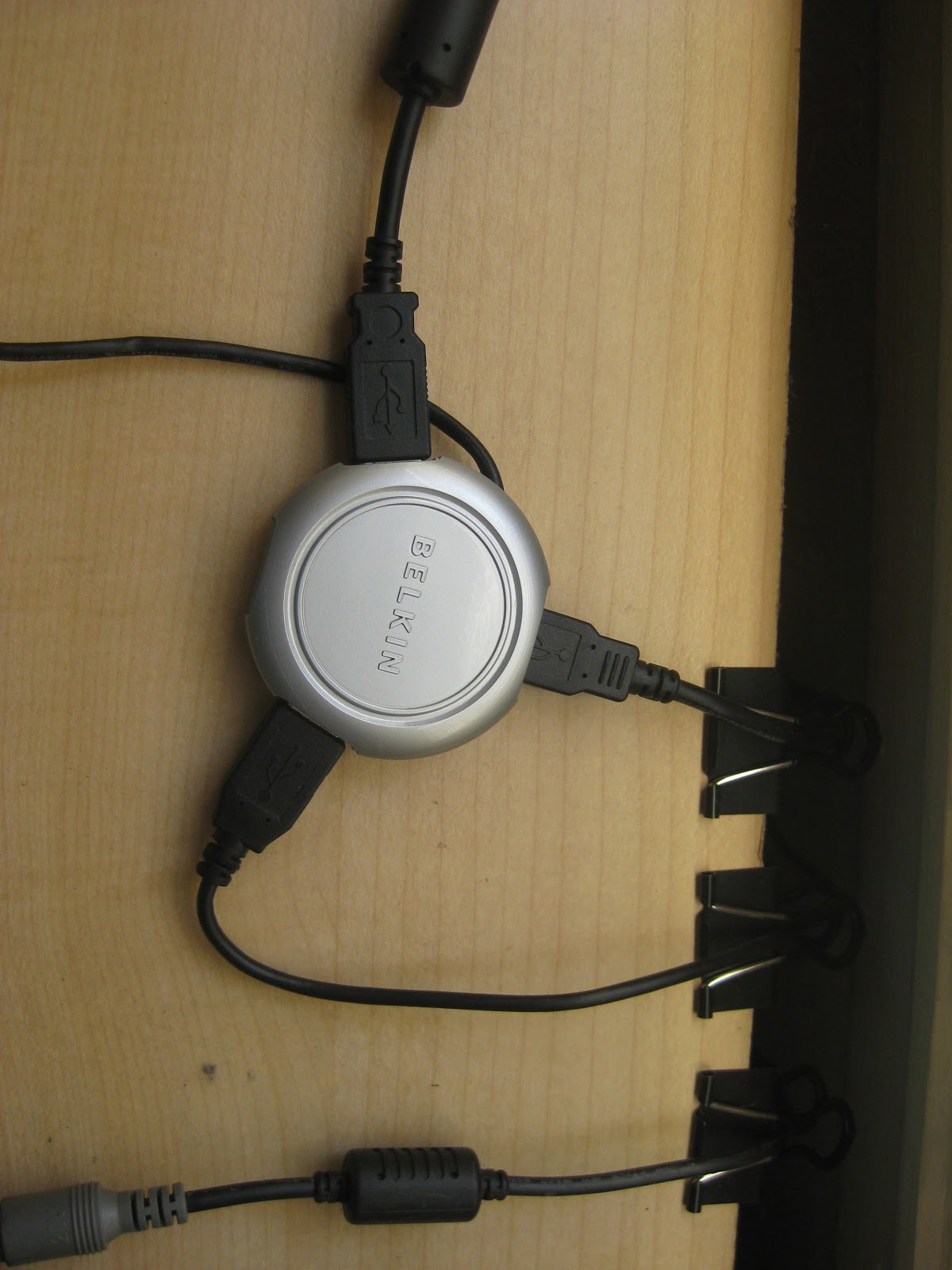
    Cable organization: How a USB hub changed my life

    Wood USB hub/iPhone holder from Etsy.Cassette USB hub avalailable on Amazon

    My new Belkin USB hub, not quite as
    cool, but still life-changing.
    It was five dollars on the sale rack at Ross.  And it changed my life.

    Okay so maybe that's an exaggeration.  But look how cable-free my computer is, even though it is currently hooked up to the external keyboard, the printer, AND the external hard-drive.  And there are two available USB ports!

    I'm using the binder clips on the side of the desk for cable storage.  My camera and iPod cables are super convenient now.


    I love cable organization.  Don't judge me.

    10.16.2010

    Chairfest 2010: That's right, I inherited an Aeron Chair


    When you spend the majority of your life on your ass, completely motionless except for spasms of violent typing, you end up thinking about chairs way too much.  I spent my first year in this apartment sitting on a wooden, farm-style, unpadded kitchen chair.


    Recently I purchased an awesome mid-century pleather chair for six dollars at the flea market, which was a slight upgrade, but it doesn't swivel, nor does it give me any lumbar support (you heard me, lumbar support).  So when my mother offered me one of her old Herman Miller Aeron office chairs, I was ecstatic.  Not only are they pretty, they are unbelievably comfortable, they swivel, and they provide lumbar support.  And did I mention they were pretty?


    Doesn't it look nice in my little office corner?  I love it so much.  I feel like my lower back is already in less pain.  I can feel the stress sheeting off me like granite.  Ah, Aeron chair, you inspire me to poetry and nature comparisons.


    And now my six dollar chair can be used for extra seating around the coffee table!


    As a side note, if you like chairs, check out chairfag.com.

    10.13.2010

    10.11.2010

    Disco makes me write faster.

    Um no but really. Unlike SecretlyCrunchy, I need music to write [only fitting since rap videos are one of my research interests]. The quarter is juuuust starting to kick it into high gear, so I'm starting to be working on papers [or bits of papers] all the time now. I have lots of old paper writing stand by music [Girl Talk, whatever the Top 40 pop/rap are, Notorious B.I.G.... more or less anything that I can pretend that I'm at a rockin' club [my cloffice] and dancin' [in my chair] at].

    So for anyone else who needs some paper-writing music, I figured I'd throw these out there. This is a 90 minute set by Dan Savage and Ira Glass from over summer in Seattle. It's awesome, and includes my new favorite song: the disco remix of "Annie Get Your Gun."

    For any other Arabophiles, the Melody Music Group channel on Youtube is solid gold. There are some seriously awesome songs AND videos on that channel. Melody Music is like an MTV or VH1 of the Arab world and it's awesome. This is the best song ever and the video includes rollerblading. Nesrin Zreik: you're awesome.


    This blog is also a really good paper-writing music source. The tapes have awesome beats, and since most of them are in languages other than English, I can't get as distracted by listening to the lyrics, because, well, I don't speak most of the languages the tapes are in. Also the album artwork for the tapes are really jazzy. Observe:


    and


    Co-habitation in a studio: Fight noise with white noise

    Poster from the Fight Noise with Noise campaign by artist Michael Horowitz.
    My little desk is about four feet from our over-sized television, and it is not easy to do academic writing when Snooki and The Situation are screaming at each other in the background.  Sure I have an office on campus, but why would I want to lug myself up there every day when I have a workspace right here, 15 feet from my bed and 20 feet from my refrigerator?

    Color block headphones by
    Fred Flare.  Way cooler looking than
    the ones my boyfriend bought.
    My boyfriend recently purchased a pair of expensive noise-reducing headphones on the internet for a very good price, and I tried them out.  All they did was block out the white noise from the street, and make the voices of the people on the television easier to understand!  In desperation I tried to drown out the noise with iTunes, but I just can't think straight when I'm listening to music.

    Enter SimplyNoise, my new best friend.  It's a free web app that plays either white noise, pink noise or brown noise at a volume of your choosing.  It will even oscillate the level for you, which is surprisingly soothing.  In case you were wondering (I was), the colors correspond to sound frequency profiles.  Just like with color, lower frequencies correspond to reds and pinks, and higher frequencies to blues and violets.  White noise (like color), is approximately the same levels of all frequencies.  It's all about the power spectrum!  Yay for fourier transforms!

    Check out SimplyNoise at www.simplynoise.com.  They also sell iPod and iPhone apps.

    10.09.2010

    Cloud computing: A fashion revolution perhaps?

    Glitter-and-Spandex and I are both about 5'2'', and we both schlep laptops and books around everywhere, hence our mutual obsession with finding the right luggage for our graduate school commutes.  Glitter has spent way too much of her precious time trying to find a suitable backpack for her small frame and glam look.  And I have spent way too much of my precious time trying to reduce the amount of stuff I have to carry so I can eliminate the need for a backpack altogether.  After hours of exhaustive research, I am convinced that cloud computing is going to change grad school fashion forever.

    Here's what I want.  A tiny netbook, that can fit in a purse.  Then I want to save everything on the internet (the cloud), so that the netbook is just a cheap conduit to my important stuff, and not inherently irreplaceable.  I never want to lose a file again, or have another hard drive crash.  I want all the papers I need to be saved in an online library so that all I have to carry is that tiny netbook.

    The most promising fulfillment of my dream is the netbook Google is probably going to come out with later this year.  Apparently it will be called the "Speedbook," and connect you to the internet within seconds of pressing the on button.  The operating system, Chrome OS, will be the browser, and the browser will the operating system.  There will be no software stored locally (no Windows, no Word, no PowerPoint, no Outlook, no iTunes). Instead, there will be the Google App store, which will offer tons of free and purchasable online apps to replace offline software.  For example, you can do word processing with Google docs, or Adobe Buzzword, instead of MS Word.  I already got rid of my email client and use Gmail exclusively, I'm halfway there!  Instead of a hard drive, you can back up your files to an online storage service like Mozy, SugarSync, Dropbox or SkyDrive, or even keep your stuff in Google docs.  I pay Mozy 5 dollars a month to keep all my music, movies and documents stored on the internet.  It's awesome, because I don't have to worry about dropping an external hard drive, or maxing out my computer solid state drive.  And if I forget anything, I always have access to every file, everywhere that there is internet.  Most of these websites offer about 2 gigs of storage completely for free, no strings attached.  SkyDrive offers 25!  I can see myself moving almost exclusively to the cloud in the next year or so.  Think of how small my bag would need to be if everything was in the cloud!  I could even skip the computer all together, carry a clutch, and use the computers in the lab (although I couldn't take notes in class).  Or I could get an awesome case for my netbook.  Or, I could get a glam netbook like the  Eee PC 1008P below, and just bring that!


    Anyhow, cloud computing I think has a  lot of implications for the fashion conscious graduate student.  Just wait, the revolution has begun.

    10.07.2010

    My collection of clutter orphanages.

    I'm all about "a place for everything and everything in its place." So much so, in fact, that I have trouble purchasing things if I cannot imagine exactly where they will go, even if there is an obvious need. Like, my boyfriend really wants to buy a toaster, but I can't imagine where we would put a toaster. So we continue to make toast on the cast iron skillet, because I stubbornly refuse to buy an appliance without first establishing a storage solution for it.

    Anyhow, there are a lot of things that appear all over a studio apartment that simply don't have a "place" of their own. Keys, hair ties, lighters, watches, etc. So I've started putting containers everywhere to catch this stuff, and its been fairly successful. I think of them as clutter orphanages, for stuff that has no "place" of its own.

    There's the table by the door clutter orphanage.


    And the random snacks clutter orphanage.


    This is my bedside table clutter orphanage.


    And this is my desktop clutter orphanage.


    And of course the toilet clutter orphanage.

    10.03.2010

    Review: Gmail Priority Inbox

    Since my computer has been rather temperamental of late, i've stopped using my mail application and started exclusively using gmail. I already have my school emails forwarded to gmail, so I only have to check one email address.

    Sometime last year I started obsessively labeling emails. I loooooooooooove labeling and overall, it works out pretttttty well. Let's take a moment for just a few of my labels shall we?


    Hot damn.

    So when gmail threw this whole priority inbox thing out there, I was intrigued. I thought it might serve as a good way to further organize my out of control inbox [my department alone has SIX listservs].

    Unfortunately, thus far priority mailbox has not helped me tame my inbox. My visions of me luxuriously, yet still oh-so-efficiently checking my email ["Oh my this email is checking is going SOOOO quickly! Ha ha ha! What a LOVELY DAY!"] are still fantasy. I don't have a smartphone [I will never surrender my $10 Target phone with an FM radio and bizarre games on it] or anywhere to work on campus, so when I get home at night, I usually have have 50 or so emails to get through before I can start my homework.

    The main problem I have found with the priority inbox is that no matter how many times I label something "important" or "not important", it just doesn't learn it's lesson. Nor can I figure out just HOW and WHAT it seems to use as it's criteria for important/not important. Random email about shampoo from a newsletter I have continually tried to unsubscribe from/mark as unimportant? IMPORTANT. Email about language study scholarships from a source repeatedly marked important? NOT IMPORTANT.

    The best I can figure out is that my pre-made filters/labels might actually be messing with the priority sorter? Maybe? Is anyone else using priority inbox and can sort out this crazy magic for me?